TLDR: Large language models (LLMs) are impressive in isolation but limited without real-world data to act on. APIs bridge that gap—letting LLMs pull live information, trigger actions, and integrate into existing systems. This post breaks down how the API-LLM relationship actually works, where it breaks under pressure, and what developers need to think about before building on top of it.
Most conversations about LLMs focus on the model itself—the parameters, the benchmark scores, which lab trained it. But a model running in a vacuum can only do so much. It can reason about what it already knows, it can write and rewrite, and it can explain things clearly. What it can't do, without external connections, however, is check whether a flight is still on time, query your database, or send an email on your behalf.
That's where APIs come in. And the relationship between APIs and LLMs is more structurally important than most people acknowledge when they're just trying to get a prototype off the ground.
What APIs Actually Do for LLMs
An API is a defined interface between two systems. Nothing more. When an LLM is given access to an API—whether through a function-calling mechanism, a tool-use framework, or an agent loop—it gains the ability to interact with live systems rather than static training data.
The implications are significant. A model trained through early 2024 doesn't know what happened last week. But if it can call a web search API, it can retrieve that information and reason about it. A model that can call a payments API can confirm whether a transaction went through. A model with access to a calendar API can find an open time slot and book a meeting.
The model handles the reasoning but the API handles the real-world interaction—neither one is sufficient alone.
The Mechanics: Function Calling and Tool Use
Modern LLMs—GPT-4, Claude, Gemini, etc.—support structured tool use natively. You define a set of available functions, describe what each one does and what parameters it expects, and the model decides when and how to call them based on context.
A simplified example: you give a model a get_weather function that accepts a city name and returns current conditions. The user asks, "Should I bring an umbrella tomorrow in Austin?" The model doesn't guess. It calls get_weather("Austin"), gets the response, and answers based on actual data.
This pattern scales. You can give a model access to dozens of tools—search, databases, internal APIs, third-party services—and it will route between them based on what the task requires. The model becomes an orchestration layer, not just a text generator.
But this can get tricky because the model doesn't actually execute code. It generates a structured output (a function name and arguments), your application code executes it, and the result gets passed back.
That round-trip adds latency, adds points of failure, and means your error handling has to account for cases where the model calls a function incorrectly or with malformed parameters.
Where the API-LLM Stack Actually Breaks
Building a demo where an LLM calls an API and returns a sensible answer is straightforward. Building something reliable enough to run in production, however, is the real challenge.
A few failure modes worth knowing:
Hallucinated Function Calls
Models will occasionally call functions with parameters that don't exist or that violate constraints you didn't explicitly document. If your API requires a date in ISO 8601 format and the model passes "next Tuesday," something downstream will fail. Defensive parsing and validation on the application layer isn't optional.
Context Window Limits Under Real Load
When you're chaining multiple API calls in an agent loop, the conversation history grows fast and tool results get appended. By the time the model needs to synthesize a final answer, it may be working with several thousand tokens of accumulated context—and performance degrades at the edges. This becomes a real problem in any workflow that requires more than three or four sequential tool calls.
Rate Limits and Latency Spikes
The APIs you're calling have their own performance characteristics. A web search API might return in 300ms on average but spike to two seconds under load. Your model inference might add another three seconds. Chained together across multiple steps, you're looking at response times that are fine for async workflows but brutal for a user expecting a snappy response.
Cost Unpredictability at Scale
Each API call has a cost and each LLM call has a cost. In an agent loop where the model decides how many tool calls to make, you don't have full control over the total spend per request. Building sensible limits—maximum iterations, fallback behaviors, caching for repeated lookups—is something most teams underestimate until the first billing surprise.
The Role of Web Search APIs in the LLM Stack
Of all the APIs an LLM can access, real-time web search is the one that addresses the most fundamental limitation: the knowledge cutoff. Training data goes stale. News breaks. Products change. Regulations update.
A web search API gives the model a reliable path to current information, which matters especially in use cases like research assistants, competitive intelligence tools, customer support bots, and any application where accuracy on recent events is non-negotiable.
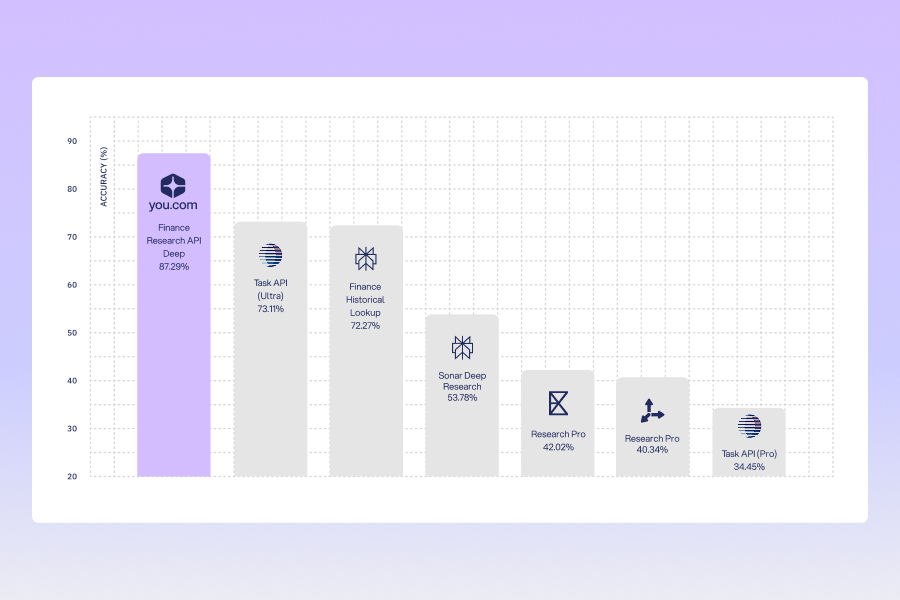
The quality of the search API matters as much as the quality of the model. A search layer that returns well-structured, high-signal results makes the model's job easier. One that returns cluttered, low-quality pages forces the model to work harder—and introduces more surface area for errors in extraction and reasoning.
What This Means for How You Build
The LLM is not the real product—the integration is the product. A model with good tool use and mediocre underlying APIs will underperform a slightly weaker model with access to accurate, fast, well-documented ones.
Before you pick a model, map the APIs your application actually needs. Understand their latency profiles, their rate limits, and their data quality characteristics, design your tool definitions carefully—vague descriptions lead to more hallucinated calls, and build validation between the model and the APIs it's calling, not just at the edges of your system.
The developers who build durable LLM applications are the ones who build clean interfaces between a reasoning layer and reliable data sources—and treat that infrastructure with the same rigor they'd apply to any other production system.

.png)
.png)

.png)